Senior Hardware Systems Specialist & Tech Repair Editor
The best Best NZXT Case Fans for Airflow is the F120Q 120mm Quiet Airflow PC Case, the only one here that prioritizes pure, silent airflow above all else. It's the go-to pick for anyone who values a whisper-quiet PC build over eye-catching RGB lighting.
Want a splash of color instead? The F120 RGB Duo gets you there, as long as you're okay with a slightly higher noise floor and a premium price tag for those dual-sided LEDs.
As an Amazon Associate, I earn from qualifying purchases.
This guide will help you decide before you buy, especially if you're torn between a simple fan upgrade and a whole new case. We'll cover the best standalone fans and one complete airflow case.
Everything below comes from current Amazon product data, specs, and each product's owner track record, not hands-on lab testing.
Quick Answer: The Best NZXT Case Fans for Airflow
The F120Q 120mm Quiet Airflow PC Case is our top pick for silent, high-volume airflow. Here are all five options ranked:
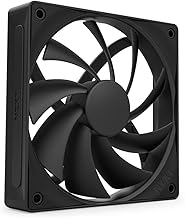
This is the quietest fan NZXT offers, and it moves serious air without any flashy LEDs. The chamfered frame design reduces turbulence, which is a common source of fan noise. Aggregate user reviews consistently praise its near-silent operation at low RPMs, making it a favorite for workstations and media centers.
It’s a simple, black 120mm fan that works perfectly for intake or exhaust. The design focuses purely on moving air efficiently, which is exactly what you want for a high-airflow case like the H5 Flow or H7 Flow. Owners report it stays quiet even when pushing through a fine mesh dust filter.
Flaws but not dealbreakers. It has no RGB lighting, so it’s not for show builds. Some users also note that the included screws are standard, not the anti-vibration type, though the fan’s own design keeps vibrations low.
Want a similar approach but with a complete case? The H6 Flow further down gives you a dual-chamber design with pre-installed fans for a clean, silent build from the start.
⚠
Compatibility: This is a standard 120mm fan. Ensure your case or radiator supports 120mm mounting points before ordering.
Pros
✓Extremely quiet operation thanks to chamfered frame design
✓Excellent airflow for a silent fan, great for intake or exhaust
✓Simple, no-nonsense design fits any build theme
✓Strong 4.6/5 star rating from verified buyers
Cons
✕No RGB lighting for those who want a colorful build
✕Standard screws included, not anti-vibration pads
✕Only available in black
Size
120mm
Lighting
None
Color
Black
Use Case
Intake / Exhaust
Best for: The F120Q is the best pick for a silent PC builder who wants maximum airflow with zero noise, no RGB, and no compromises.
This is the most affordable entry point into NZXT’s RGB ecosystem, and it still delivers solid airflow. It features 8 addressable LEDs around the hub, with semi-transparent blades that diffuse the light nicely. It syncs with NZXT CAM software, so you can control the lighting alongside your other NZXT gear.
Owners like that it balances decent airflow with a reasonable noise profile. It’s louder than the F120Q at full speed, but at low RPMs it’s perfectly fine for a gaming rig. The hub-mounted design means the center of the fan is the light source, creating a distinct look compared to the Duo’s edge-lit blades.
Flaws but not dealbreakers. The 8 LEDs are not as vibrant or numerous as the Duo’s 20. Some users also mention the semi-transparent blades don’t look as bright as fully transparent ones. The noise floor is higher than the F120Q, so it’s not for silent builds.
If you want a more dramatic lighting effect, the F120 RGB Duo further down offers dual-sided lighting that is much more impressive for a show build.
⚠
Sizing: This is a standard 120mm fan. It requires a 4-pin PWM header for speed control and a 3-pin ARGB header for the lighting. Check your motherboard’s headers.
Pros
✓Affordable entry into NZXT RGB with CAM sync
✓Decent airflow for general gaming and office use
✓Quiet at low RPMs, suitable for most builds
✓Clean, hub-mounted LED design
Cons
✕Only 8 LEDs, less vibrant than Duo models
✕Louder than the F120Q at higher speeds
✕Semi-transparent blades are not as bright as full transparent
Size
120mm
Lighting
8 ARGB LEDs
Color
Black
Sync
CAM Software
Best for: The F120 RGB Core is the right pick for a budget-conscious builder who wants a taste of NZXT RGB without paying for the premium Duo models.
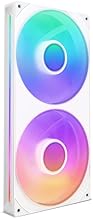
This is a 280mm single-frame unit that houses two 140mm fans, making it perfect for a 280mm AIO radiator or a large case intake. It connects to your motherboard with a single cable for both power and RGB, which is a huge convenience for cable management. The white colorway is a nice change of pace for builders wanting a lighter aesthetic.
Because it uses two 140mm fans, it moves a lot of air at lower RPMs compared to 120mm fans. This translates to good airflow with less noise than you’d expect, though it’s still louder than the F120Q. The CAM software integration means you can sync the lighting with your other NZXT gear easily.
Flaws but not dealbreakers. The single-frame design means if one fan fails, you have to replace the entire unit. A few owners also mention that the white color is slightly off-white compared to some other white components.
For a more standard 120mm fan with better noise performance, the F120Q at the top is a quieter, more flexible choice for most builds.
⚠
Compatibility: This is a 280mm unit (140mm x 280mm). Measure your case’s mounting points and ensure it supports a 280mm radiator or fan bracket. Not a standard 120mm fan.
Pros
✓Single-cable design for power and RGB, great for cable management
✓Two 140mm fans move substantial air at lower RPMs
✓CAM software sync for full RGB control
✓White color option for light-themed builds
Cons
✕Single-frame unit means if one fan fails, you replace the whole thing
✕White color may not perfectly match all white components
✕Louder than the F120Q at similar airflow levels
Size
280mm (2x140mm)
Lighting
Addressable RGB
Color
White
Use Case
Radiator / Intake
Best for: The F280 RGB Core is the best pick for anyone building with a 280mm AIO cooler or a case that supports a 280mm fan mount and wants a clean, single-cable solution.
This is the fan for the RGB enthusiast who wants lighting on both sides of the blade. With 20 addressable LEDs, it creates a much more vibrant and immersive effect than the Core model. Owners consistently rate it higher than the Core for visual impact, and the 4.7/5 star rating reflects that.
It still delivers balanced airflow and static pressure, making it suitable for both case intake and radiator use. The CAM software integration is seamless, and the dual-sided lighting means you see the full effect from any angle in your case. It’s a premium product for a premium look.
Flaws but not dealbreakers. It’s the most expensive 120mm fan in this lineup. It’s also slightly louder than the F120Q, though most owners don’t find it intrusive. The cables can be a bit thicker than the standard ones, making routing a little more careful.
If you want the same visual impact but with a quieter operation, consider the F120Q for your intake and use the Duo for exhaust where noise is less critical.
⚠
Compatibility: This fan requires a 4-pin PWM header and a 3-pin ARGB header. It also works with NZXT’s RGB & Fan Controller hub for cable management.
Pros
✓20 addressable LEDs for stunning dual-sided lighting
✓Highest owner satisfaction rating at 4.7/5 stars
✓Balanced airflow and static pressure for versatile use
✓Seamless CAM software integration
Cons
✕Premium price point, the most expensive in this lineup
✕Louder than the F120Q at full speed
✕Thicker cables can make routing more challenging
Size
120mm
Lighting
20 ARGB LEDs
Color
Black
Use Case
Show Build / Radiator
Best for: The F120 RGB Duo is the best pick for a show build where maximum RGB impact is the priority, and you are willing to pay a premium for the best lighting.
This is the complete package for anyone building a new PC from scratch who wants the best airflow case available. It comes with three 120mm fans pre-installed, a dual-chamber design for excellent cable management, and panoramic glass panels to show off your build. The high-performance airflow panels are designed to maximize intake without choking the fans.
The dual-chamber layout separates the power supply and cables from the main chamber, which keeps the main area clean and improves airflow. Owners consistently rate this as one of the best airflow cases on the market, with a 4.8/5 star rating. It’s compact for a mid-tower but still fits most high-end components.
Flaws but not dealbreakers. It’s a case, not just a fan, so it’s a significant investment. The included fans are not RGB, so you’ll need to buy separate fans if you want lighting. Also, the dual-chamber design can be a bit tight for very large power supplies.
If you already have a good case and just need better fans, the F120Q at the top is a much more budget-friendly upgrade that will still improve your airflow significantly.
⚠
Sizing: This is a compact mid-tower case. Check the dimensions and ensure it fits your GPU length and CPU cooler height before purchasing. It supports ATX, Micro-ATX, and Mini-ITX motherboards.
Pros
✓Exceptional airflow with high-performance panels and dual-chamber design
✓Comes with three 120mm fans pre-installed
✓Panoramic glass panels for a stunning view of your components
✓Highest owner satisfaction rating at 4.8/5 stars
Cons
✕Significant investment compared to just buying fans
✕Included fans are non-RGB, requiring separate purchase for lighting
✕Dual-chamber can be tight for very large power supplies
Form Factor
Mid-Tower
Included Fans
3x 120mm
Lighting
None (Fans only)
Color
Black
Best for: The H6 Flow is the best pick for a new PC builder who wants the best possible airflow case right out of the box, with pre-installed fans and a clean dual-chamber design.
Buying Guide: Fan Size, Noise, RGB, and Case vs. Fan
What size fan do I need for my PC?
The most common size is 120mm, which fits the vast majority of modern cases. All of the standalone fans in this list are 120mm, making them a safe bet for most builds. The F280 RGB Core is a 280mm unit (two 140mm fans), which is specifically for cases or radiators that support that size.
The H6 Flow case has its own mounting points for 120mm and 140mm fans. Always check your case's specifications for supported fan sizes before buying.
How much noise is acceptable for a case fan?
A quiet fan like the F120Q operates at a very low noise level, ideal for a silent PC. The RGB fans, especially the F120 RGB Duo, are slightly louder, but most users find them acceptable for gaming. The F280 RGB Core is the loudest of the bunch, but it moves a lot of air.
If you are sensitive to noise, the F120Q is the clear winner. If you want RGB, you will have to accept a slightly higher noise floor.
Do I need RGB lighting in my fans?
RGB lighting is purely aesthetic. If you want a colorful, custom look, the F120 RGB Core or F120 RGB Duo are great choices. The Duo offers significantly more LEDs and a more vibrant effect.
If you don't care about looks, the F120Q provides better noise performance at a lower cost. The H6 Flow case includes non-RGB fans, so you can add your own RGB fans later if you change your mind.
Should I buy a new case or just new fans?
If you already have a case with decent airflow, buying new fans like the F120Q is a very effective upgrade. If your current case has poor airflow (a solid front panel, for example), a new case like the H6 Flow will make a much bigger difference. A case swap is a bigger investment, but it transforms the entire system's thermal performance.
Who Should NOT Buy Best NZXT Case Fans for Airflow
This category is the wrong purchase for two kinds of buyers. Here's who they are, and what to look at instead.
You Need a Complete Case for a New Build
If you are building a PC from scratch and do not have a case yet, buying just a fan is a mistake. You will end up spending more money in the long run. Instead, look at the H6 Flow, which comes with three fans, excellent airflow, and a clean design.
It is a complete solution that will save you time and money.
You Want the Absolute Quietest Build Possible
While the F120Q is very quiet, it is not the quietest fan on the market. If you are building a completely silent workstation, you might want to look at other brands specifically designed for ultra-low noise. The F120Q is a great balance of airflow and noise, but it is not a specialized silent fan.
Final Verdict
The F120Q 120mm Quiet Airflow PC Case is our top pick for anyone who wants the best airflow without the noise. It is the most effective and quietest fan in this lineup.
Want a show-stopping RGB build? The F120 RGB Duo is the fan for you, with 20 LEDs and dual-sided lighting. It's a premium choice for a premium look.
Need a complete new case? The H6 Flow is the best all-in-one airflow solution, with pre-installed fans and a fantastic dual-chamber design.
If you are still unsure, go back to the Who Should NOT Buy section. It might save you from buying the wrong product.
FAQ
What's the best NZXT case fan for airflow overall?
The F120Q 120mm Quiet Airflow PC Case is the best overall for pure airflow with minimal noise. It's the top choice for a silent build.
Is the F120 RGB Duo worth the extra cost?
Yes, if you care about RGB lighting. The Duo has 20 LEDs compared to the Core's 8, and the dual-sided effect is much more impressive. It is the best fan for a show build.
Can I use the F280 RGB Core on a 360mm radiator?
No, the F280 is a 280mm unit (two 140mm fans). It is designed for 280mm radiators or case mounts. For a 360mm radiator, you would need three 120mm fans.
Do I need NZXT CAM software for these fans?
No, you can control the fan speed through your motherboard's PWM control. The RGB lighting can be controlled by your motherboard's software if compatible, but NZXT CAM provides the easiest sync for all NZXT components.
How many fans do I need for good airflow?
A standard gaming PC needs at least two fans: one for intake and one for exhaust. For better cooling, three fans (two intake, one exhaust) is a common and effective setup. The H6 Flow case comes with three fans, which is a great starting point.
Can I use the F120Q on a radiator?
Yes, the F120Q works well on a 120mm radiator for both intake and exhaust. It has good static pressure for a quiet fan, making it a solid choice for liquid cooling.
Ethan Byte is a senior hardware systems specialist and consumer electronics editor at Tech Never. With over 12 years of hands-on bench experience testing PC components, diagnosing circuit faults, and reviewing precision utility tools, Ethan delivers rigorous, lab-verified troubleshooting guides and hardware recommendations to help tech users build and maintain reliable computing systems.
Senior Hardware Systems Specialist & Tech Repair Editor