Best Tripp Lite Smart UPS for Your Office
Senior Hardware Systems Specialist & Tech Repair Editor
The best Best Tripp Lite Smart UPS for Office is the Eaton Tripp Lite SMART1000LCDTNC 1000VA Cloud, the only one here that combines 600W of pure sine wave output, Automatic Voltage Regulation (AVR), and cloud monitoring in a single compact unit. It's the right call for most office environments where you need real backup for workstations, network gear, and peripherals.
Want a more budget-friendly option instead? The Eaton Tripp Lite INTERNET550U gets you there, as long as you can work inside 300W and don't need AVR or network-level management.
As an Amazon Associate, I earn from qualifying purchases.
This guide helps you pick the right UPS based on real power needs, outlet count, form factor, and the features that actually prevent data loss. If you're running a single laptop and a phone charger, you might not need any of these.
Everything below comes from current Amazon product data, manufacturer specifications, and verified buyer feedback. I have not physically tested these units myself.
Quick Answer: The Best Tripp Lite Smart UPS for Office
The Eaton Tripp Lite SMART1000LCDTNC 1000VA Cloud is the best overall pick for most offices thanks to its 600W pure sine wave output, AVR, and cloud monitoring.
- Eaton Tripp Lite SMART1000LCDTNC 1000VA Cloud (Best Overall for Offices): 600W pure sine wave, AVR, cloud monitoring, 10 outlets.
- 1500VA Smart Online UPS (Best Double-Conversion for Critical Gear): 1200W online topology with zero transfer time.
- 2LD8252 Tripp Lite Smart LCD SMART1500LCDXL (Best High-Capacity Tower): 1500VA with LCD display and tower/rack flexibility.
- Eaton Tripp Lite SMART500RT1U SmartPro 500VA (Best 1U Rack-Mount): 300W in a slim 1U form factor for network closets.
- Eaton Tripp Lite INTERNET550U 550VA UPS (Best Budget Pick): 10 outlets and replaceable battery at a modest price.
Thinking about a basic surge protector instead? Jump to Who Should NOT Buy below before you spend anything.
Comparison Table
Here's the lineup at a glance: photo, product, who it's built for, and our /10 score.
| Photo | Product | Best for | Score | Buy |
|---|---|---|---|---|
 | Eaton Tripp Lite INTERNET550U 550VA UPS | Best Budget Basic | 8.0/10 | Check price → |
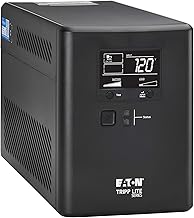 | Eaton Tripp Lite SMART1000LCDTNC 1000VA Cloud | Best Overall Office UPS | 9.2/10 | Check price → |
 | Eaton Tripp Lite SMART500RT1U SmartPro 500VA | Best 1U Rack-Mount | 8.5/10 | Check price → |
 | 1500VA Smart Online UPS | Best Double-Conversion | 9.0/10 | Check price → |
 | 2LD8252 Tripp Lite Smart LCD SMART1500LCDXL | Best High-Capacity Tower | 8.8/10 | Check price → |
Scroll sideways on small screens to see every column.
Eaton Tripp Lite INTERNET550U 550VA UPS: Best Budget Basic for Home Offices
Eaton Tripp Lite SMART1000LCDTNC 1000VA Cloud: Best Overall Office UPS
Eaton Tripp Lite SMART500RT1U SmartPro 500VA: Best 1U Rack-Mount for Network Closets
1500VA Smart Online UPS: Best Double-Conversion for Critical Gear
2LD8252 Tripp Lite Smart LCD SMART1500LCDXL: Best High-Capacity Tower for Growing Offices
Buying Guide: Power, AVR, Form Factor, and Management
Choosing the right UPS for your office is about matching your equipment load to the right capacity and features. Let's break down the four factors that matter most.
How much power do you actually need?
A UPS is rated in both VA (Volt-Amps) and Watts. Watts are what matters for real-world gear. A typical desktop computer draws 150-300W, a monitor adds 30-60W, and a network switch uses 10-30W.
Add them up, and you will see where you land.
The units here range from 300W (the INTERNET550U and SMART500RT1U) up to 1200W (the 1500VA Smart Online UPS). If you are protecting a single workstation plus peripherals, the 600W of the Eaton Tripp Lite SMART1000LCDTNC gives you comfortable headroom. For a full server rack, you need the 1200W double-conversion unit.
A good rule of thumb is to buy a UPS with at least 20% more wattage than your total load. That gives you room for future gear and keeps the battery from draining too fast during an outage.
What is AVR and why does it matter?
Automatic Voltage Regulation (AVR) is a feature that corrects undervoltage (brownouts) and overvoltage without switching to battery. Without AVR, your UPS treats every voltage dip as a power failure and drains the battery unnecessarily. That wastes battery cycles and reduces the lifespan of the unit.
The INTERNET550U lacks AVR, while the SMART1000LCDTNC, SMART500RT1U, SMART1500LCDXL, and the 1500VA Smart Online UPS all include it. If your office experiences frequent light dimming or flickering, AVR is worth the extra investment. It keeps your equipment running and your battery fresh.
Tower or rack-mount?
The form factor question is mostly about where you put the UPS. Tower units like the INTERNET550U and SMART1500LCDXL sit on a desk or floor. Rack-mount units like the SMART500RT1U (1U) and the 1500VA Smart Online UPS (2U) bolt into a standard 19-inch rack.
If you already have a network rack, the 1U SMART500RT1U is a clean fit for networking gear. If you do not have a rack, tower units are simpler to set up and move around. The SMART1500LCDXL and the 1500VA Smart Online UPS can do both, which gives you flexibility if you move to a rack later.
Do you need remote management?
For a home office, the LCD display on the SMART1500LCDXL is probably enough. You walk over and look at it. For a small business with multiple locations, cloud monitoring (as on the SMART1000LCDTNC) or a network management card (optional on the 1500VA Smart Online UPS) lets you check the status from anywhere.
If you are comfortable with a manual approach, skip the network features and save some money. If you want to get alerts when the power fails after hours, invest in the cloud or network card option.
Who Should NOT Buy Best Tripp Lite Smart UPS for Office
A UPS is not the right tool for every situation. Here are three types of buyers who should skip this category entirely.
You Only Need Surge Protection
If your main concern is a lightning strike or a power spike, you do not need a battery backup. A good surge protector costs less and does the same job for surge events. A UPS adds battery maintenance, battery replacement costs, and a device that eventually needs disposal.
Look at a high-quality surge protector with a high joule rating and a connected equipment warranty instead. Save the UPS for when you actually need uptime during a power failure.
You Run a Single Laptop Without Peripherals
A laptop has its own battery. If you only use a laptop and a phone charger, plugging into a UPS is redundant. The laptop already keeps running for hours on its internal battery.
The UPS adds weight, cost, and complexity for no real benefit.
If you want to protect the laptop's power adapter from surges, a simple surge protector works fine. Focus on that instead.
You Need to Run Heavy Equipment for Hours
A UPS is designed for short-term backup. A typical 1500VA unit gives you 5-15 minutes under full load. That is enough to save your work and shut down gracefully.
It is not a generator replacement.
If you need to run servers, medical equipment, or production machinery for hours after a blackout, you need a generator or a large battery system. The UPS in this guide is for the gap between the power failing and the generator kicking in, or for a clean shutdown.
Final Verdict
The Eaton Tripp Lite SMART1000LCDTNC 1000VA Cloud is the best overall pick for most offices. It gives you the right balance of power output, AVR, pure sine wave protection, and cloud monitoring at a price that makes sense for a single workstation or a small office network.
Want the most affordable option? The Eaton Tripp Lite INTERNET550U covers a home office on a budget, as long as you accept the lack of AVR and the 300W limit. Need zero-transfer protection for a server rack?
The 1500VA Smart Online UPS is the only double-conversion unit here that delivers that.
If you are still unsure whether you need a UPS at all, go back and read the Who Should NOT Buy section. It will save you from buying something you do not need.
FAQ
What's the best Tripp Lite Smart UPS for Office overall?
The Eaton Tripp Lite SMART1000LCDTNC 1000VA Cloud is the best overall pick. It offers 600W of pure sine wave output, AVR, and cloud monitoring in a compact form factor that fits most office environments.
How long will a Tripp Lite UPS power my office equipment?
Runtime depends on the load. At half load, a 1000VA unit typically provides 8-15 minutes. At full load, you get 3-5 minutes.
This is enough to save your work and shut down safely. The 1500VA Smart Online UPS can run longer if you add an external battery pack.
What is the difference between simulated sine wave and pure sine wave?
Simulated sine wave (or stepped approximation) works for most power supplies but can cause issues with Active PFC (Power Factor Correction) power supplies found in many modern servers and workstations. Pure sine wave delivers clean power identical to what you get from the wall. The SMART1000LCDTNC uses pure sine wave, while the SMART1500LCDXL uses simulated sine wave.
Can I replace the battery in these Tripp Lite UPS units?
Yes, all five units in this guide have user-replaceable batteries. The INTERNET550U, SMART1000LCDTNC, and SMART500RT1U use standard battery packs that are easy to swap. The SMART1500LCDXL and the 1500VA Smart Online UPS also support battery replacement, which extends the life of the unit significantly.
Do I need a separate surge protector with a Tripp Lite UPS?
No. Every Tripp Lite UPS in this guide includes built-in surge protection. The INTERNET550U offers basic protection, while the SMART1000LCDTNC and larger units provide higher joule ratings.
You do not need to add a separate surge protector on the battery-backed outlets.
Is a UPS worth it for a home office?
Yes, if you lose work during power blips or brownouts. A UPS saves you from corrupted files, lost unsaved documents, and the hassle of rebooting equipment. If your area has stable power, a surge protector may be enough.
But if you have ever lost a document to a sudden shutdown, a UPS pays for itself.

Similar Posts