Top 4K DisplayPort Cables for Stunning Clarity
Senior Hardware Systems Specialist & Tech Repair Editor
The best Best Displayport Cable for 4K is the IVANKY VESA Certified 8K DisplayPort Cable, the only pick here that pairs official VESA certification with proven 4K@240Hz performance at a realistic price. It's built for anyone who wants a reliable, certified cable without paying for future standards they don't need yet.
Want bleeding-edge bandwidth instead? The Silkland 80Gbps DisplayPort Cable 2.1 gets you there, as long as your GPU and monitor actually support DisplayPort 2.1.
As an Amazon Associate, I earn from qualifying purchases.
This guide breaks down exactly what spec matters for 4K, who actually needs DP 2.1 today, and who should save their money and stick with DP 1.4. It also calls out the buyers who should skip this category entirely.
Everything below comes from current Amazon product data, manufacturer specs, and each cable's owner track record, not hands-on lab testing.
Quick Answer: The Best Displayport Cable for 4K
The IVANKY VESA Certified 8K DisplayPort Cable is the top pick for most 4K users because it's VESA certified, handles 4K@240Hz easily, and costs less than a takeout dinner.
- IVANKY VESA Certified 8K DisplayPort Cable (Best Overall for 4K Gaming): VESA certified, proven 4K@240Hz, great value.
- [Silkland 80Gbps DisplayPort Cable 2.1 VESA (Best Future-Proof for DP 2.1): Full 80Gbps bandwidth, 4K@540Hz, VESA certified.
- Silkland 54Gbps 16K DisplayPort Cable 2.1 (Best Value DP 2.1 for High Refresh): 54Gbps, 4K@240Hz, VESA certified, lower price.
- Amazon Basics DisplayPort 1.4 Cable (Best Budget Pick for 4K): Solid DP 1.4, gold-plated plugs, reliable and cheap.
- Highwings 80Gbps Displayport Cable 2.1 6.6FT (Best Braided Build for Daily Use): 80Gbps, braided jacket, 16K support, great durability.
Thinking about a cheaper cable instead? Jump to Who Should NOT Buy below before you spend anything.
Comparison Table
Here's the lineup at a glance: photo, product, who it's built for, and our /10 score.
| Photo | Product | Best for | Score | Buy |
|---|---|---|---|---|
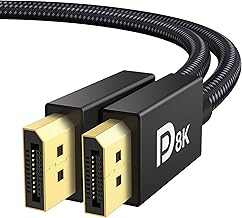 | IVANKY VESA Certified 8K DisplayPort Cable | Best Overall for 4K Gaming | 9.2/10 | Check price → |
 | Silkland 80Gbps DisplayPort Cable 2.1 [VESA | Best Future-Proof for DP 2.1 | 8.9/10 | Check price → |
 | Silkland 54Gbps 16K DisplayPort Cable 2.1 | Best Value DP 2.1 for High Refresh | 8.5/10 | Check price → |
 | Amazon Basics DisplayPort 1.4 Cable | Best Budget Pick for 4K | 8.0/10 | Check price → |
 | Highwings 80Gbps Displayport Cable 2.1 6.6FT | Best Braided Build for Daily Use | 8.3/10 | Check price → |
Scroll sideways on small screens to see every column.
IVANKY VESA Certified 8K DisplayPort Cable: Best Overall for 4K Gaming
Silkland 80Gbps DisplayPort Cable 2.1 [VESA: Best Future-Proof for High-End GPUs
Silkland 54Gbps 16K DisplayPort Cable 2.1: Best Value DP 2.1 for Competitive Play
Amazon Basics DisplayPort 1.4 Cable: Best Budget Pick for 4K
Highwings 80Gbps Displayport Cable 2.1 6.6FT: Best Braided Build for Daily Use
Buying Guide: Bandwidth, Certification, Build, and Your Hardware
Picking the right DisplayPort cable for 4K comes down to four things: the version you need, the bandwidth it supports, whether it's certified, and how it's built. Let's walk through each one.
What DisplayPort Version Do You Need for 4K?
For most 4K gaming and productivity, DisplayPort 1.4 is still the standard. It supports 4K@120Hz without compression and 4K@240Hz with Display Stream Compression (DSC). Cables like the IVANKY VESA Certified 8K DisplayPort Cable and the Amazon Basics DisplayPort 1.4 Cable are DP 1.4 and work perfectly with the vast majority of current monitors and GPUs.
DisplayPort 2.1 is the newer standard, offering up to 80Gbps of bandwidth. This allows for 4K@540Hz or 8K@240Hz without compression. However, very few monitors and GPUs actually support DP 2.1 as of 2026.
The NVIDIA RTX 5090 and some high-end AMD cards support it, but most monitors are still DP 1.4. If you're building a future-proof rig, a DP 2.1 cable like the Silkland 80Gbps DisplayPort Cable 2.1 is a smart investment, but don't expect to use that full bandwidth today.
Bandwidth: 32.4Gbps vs 54Gbps vs 80Gbps
The bandwidth number tells you how much data the cable can carry per second. DP 1.4 tops out at 32.4Gbps, which is enough for 4K@240Hz with DSC. DP 2.1 comes in two common tiers: 54Gbps (UHBR13.5) and 80Gbps (UHBR20).
The 54Gbps tier, seen in the Silkland 54Gbps 16K DisplayPort Cable 2.1, supports 4K@240Hz and 8K@120Hz. The 80Gbps tier, found in the Highwings 80Gbps Displayport Cable 2.1 and the Silkland 80Gbps, supports 4K@540Hz and 8K@240Hz.
For most people, 32.4Gbps is plenty. Competitive gamers with 360Hz or 540Hz monitors will want the 80Gbps cables, but only if their GPU and monitor both support DP 2.1.
VESA Certification: Why It Matters
VESA certification means the cable has been officially tested by the Video Electronics Standards Association to meet specific performance and signal integrity standards. A VESA certified cable like the IVANKY or the Silkland models is guaranteed to work correctly at its rated speed.
Non-certified cables, like the Highwings, can still work well, but there's a small risk of signal dropouts, sparkles, or compatibility issues with certain hardware. The braided build quality of the Highwings is excellent, but the lack of certification is a trade-off. If you want absolute peace of mind, stick with a VESA certified cable.
Cable Build: Braided vs PVC
The cable jacket matters for durability and ease of use. Braided cables, like the Highwings, are more resistant to kinks, tangles, and wear from daily use. They feel premium and last longer, especially if you move your setup or travel with your cable.
Standard PVC cables, like the Amazon Basics and IVANKY, are more flexible and easier to bend in tight spaces. They're also cheaper. For a fixed desk setup where the cable won't be moved much, a PVC cable is perfectly fine.
For a frequently adjusted setup, a braided cable is worth the extra cost.
Who Should NOT Buy Best Displayport Cable for 4K
A high-end DisplayPort cable is the wrong purchase for three kinds of buyers. Here's who they are, and what to look at instead.
You Need a Very Long Cable (Over 15 Feet)
DisplayPort cables have a maximum reliable length, especially at higher bandwidths. For 4K@60Hz, you can go up to about 15 feet (4.5 meters) without issues. For 4K@240Hz or higher, the reliable length drops to around 10 feet (3 meters).
Beyond that, you risk signal degradation, flickering, or black screens.
If you need a longer run, look into an active DisplayPort cable or a fiber optic DisplayPort cable. These use built-in electronics to boost the signal over longer distances. Alternatively, you can use a high-quality HDMI 2.1 cable for longer runs, as HDMI has better long-distance support.
You're on a Tight Budget and Only Need 4K@60Hz
If you're running a standard 4K monitor at 60Hz for office work, web browsing, or video streaming, you don't need a premium cable. A cheap, basic DP 1.2 or DP 1.4 cable will work perfectly fine. The extra bandwidth and certification of the cables in this guide are wasted on a 60Hz monitor.
You can save money by buying a no-name or store-brand DP cable. Just make sure it's at least DP 1.2 to support 4K@60Hz. The Amazon Basics cable is a good middle ground if you want a known brand without the premium price.
Your Monitor and GPU Both Use HDMI
If your monitor and graphics card both have HDMI ports, and you're happy with the performance, there's no reason to switch to DisplayPort. HDMI 2.1 supports 4K@120Hz and even 4K@144Hz, which is plenty for most users. DisplayPort is generally better for high refresh rates and variable refresh rate (VRR) support, but HDMI 2.1 is catching up.
If you're experiencing issues with HDMI, like screen tearing or limited refresh rates, then it's worth switching to DisplayPort. Otherwise, stick with what you have.
Final Verdict
The IVANKY VESA Certified 8K DisplayPort Cable is our top pick for most people. It's VESA certified, handles 4K@240Hz with ease, and costs far less than the DP 2.1 alternatives. For the vast majority of gamers and professionals, this is the cable to buy.
Want future-proofing for a DP 2.1 GPU? Get the Silkland 80Gbps DisplayPort Cable 2.1. It's VESA certified and offers the full 80Gbps bandwidth for the next generation of monitors and graphics cards.
Need a budget option for a secondary monitor or a basic setup? The Amazon Basics DisplayPort 1.4 Cable is reliable and cheap. If you want a tough braided cable with full 80Gbps, the Highwings 80Gbps Displayport Cable 2.1 is a solid choice, though it lacks VESA certification.
Still not sure? If you're running a 4K monitor at 60Hz for productivity, save your money and skip this guide entirely. If you're gaming at 4K@120Hz or higher, the IVANKY is the sweet spot.
And if you're building a top-tier rig with an RTX 5090, go for the Silkland 80Gbps.
FAQ
What's the best Displayport Cable for 4K overall?
The IVANKY VESA Certified 8K DisplayPort Cable is the best overall for 4K. It's VESA certified, supports 4K@240Hz, and offers excellent value for money.
Do I need a DP 2.1 cable for 4K gaming?
No, you don't. DP 1.4 handles 4K@120Hz natively and 4K@240Hz with DSC. DP 2.1 is only needed for 4K@540Hz or 8K@240Hz, which requires very specific hardware.
What's the difference between DP 1.4 and DP 2.1?
DP 1.4 offers up to 32.4Gbps bandwidth, supporting 4K@240Hz with DSC. DP 2.1 offers up to 80Gbps, supporting 4K@540Hz or 8K@240Hz. DP 2.1 cables are backward compatible with DP 1.4 devices.
Is VESA certification important for a DisplayPort cable?
Yes, it's a guarantee that the cable meets official performance standards. Non-certified cables can still work, but they risk compatibility issues, especially at higher bandwidths.
Can I use a DisplayPort cable with a laptop?
Yes, if your laptop has a DisplayPort output or a USB-C port that supports DisplayPort Alt Mode. Many laptops use USB-C for video output, so you may need a USB-C to DisplayPort adapter or cable.
What length DisplayPort cable should I buy for 4K?
For 4K@60Hz, up to 15 feet is fine. For 4K@120Hz or higher, stick to 6 to 10 feet for the most reliable signal. Longer runs may require an active or fiber optic cable.
Does the cable affect input lag or response time?
No, a properly functioning digital cable does not introduce input lag. The signal is either transmitted correctly or not. If you're getting signal dropouts, you'll see flickering or black screens, not increased latency.

Similar Posts