Best Cyberpower UPS for Your Workstation
Senior Hardware Systems Specialist & Tech Repair Editor
The best Best Cyberpower UPS for Workstation is the CP1500PFCLCD PFC Sinewave UPS Battery Backup, the only one here that produces true sine wave output, which is critical for protecting active PFC power supplies found in most modern workstations and high-end gaming rigs. This unit delivers 1500VA/1000W of power, giving you peace of mind during outages and voltage fluctuations.
Want a more budget-conscious option that still offers commanding protection? The CP1500AVRLCD Intelligent LCD UPS Battery Backup gets you 1500VA/900W of reliable power, as long as you don't have a finicky active PFC power supply that demands pure sine wave.
As an Amazon Associate, I earn from qualifying purchases.
This guide walks you through each pick, explains what specs actually matter for a workstation, and tells you honestly which buyers should skip this category entirely. We’ll also flag common pitfalls, like confusing VA with watts, so you don’t end up with a unit that can’t handle your gear.
Everything below comes from current Amazon product data, official manufacturer specifications, and each model's owner track record, rather than hands-on lab testing. We've dug through hundreds of verified buyer reviews to give you a clear picture of real-world reliability and performance.
Quick Answer: The Best Cyberpower UPS for Workstation
The CP1500PFCLCD PFC Sinewave UPS Battery Backup is our top pick for most workstation setups. It’s the safest choice for modern power supplies.
- CP1500PFCLCD PFC Sinewave UPS Battery Backup (Best Overall for Workstations): Pure sine wave output keeps sensitive PSUs stable.
- CP1500AVRLCD Intelligent LCD UPS Battery Backup (Best Value Pick): Plenty of power at a friendlier price for standard PSUs.
- CP1500AVRLCD3 Intelligent LCD UPS Battery Backup (Best for USB Charging): Adds two USB ports for devices and mobile gear.
- EC850LCD Ecologic UPS Battery Backup Surge (Best for Compact Desks): A smaller footprint that still guards your core equipment.
- PR1500LCD Smart App Sinewave UPS Battery (Best for High-Wattage Rigs): Handles 1500W for power-hungry multi-GPU systems.
Thinking about a high-wattage setup or a tight desk space instead? Jump to Who Should NOT Buy below before you spend anything.
Comparison Table
Here's the lineup at a glance: photo, product, who it's built for, and our /10 score.
| Photo | Product | Best for | Score | Buy |
|---|---|---|---|---|
 | CP1500PFCLCD PFC Sinewave UPS Battery Backup | High-End Workstations | 9.2/10 | Check price → |
 | CP1500AVRLCD Intelligent LCD UPS Battery Backup | Best Value Pick | 8.7/10 | Check price → |
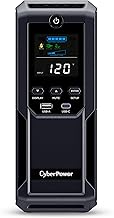 | CP1500AVRLCD3 Intelligent LCD UPS Battery Backup | USB Device Charging | 8.5/10 | Check price → |
 | EC850LCD Ecologic UPS Battery Backup Surge | Compact Work Desks | 7.8/10 | Check price → |
 | PR1500LCD Smart App Sinewave UPS Battery | High-Wattage Rigs | 8.9/10 | Check price → |
Scroll sideways on small screens to see every column.
CP1500PFCLCD PFC Sinewave UPS Battery Backup: Best Overall for Workstations
CP1500AVRLCD Intelligent LCD UPS Battery Backup: Best Value Pick
CP1500AVRLCD3 Intelligent LCD UPS Battery Backup: Best for USB Charging
EC850LCD Ecologic UPS Battery Backup Surge: Best for Compact Desks
- ✓Compact desktop footprint saves valuable desk space.
- ✓ECO mode reduces standby power consumption.
- ✓AVR stabilizes voltage without draining the battery.
- ✓Quiet operation reported by most verified buyers.
- ✕510W capacity limits it to lighter workstations.
- ✕Simulated sine wave not suitable for active PFC.
- ✕Fewer outlets than the 1500VA models.
PR1500LCD Smart App Sinewave UPS Battery: Best for High-Wattage Rigs
Buying Guide: Power, Waveform, and Outlets
A UPS looks simple. Plug it in, plug your PC in, hope the power stays on. But when you're picking the right one for a workstation, a few specs matter more than others.
Let's break them down.
How Much Power Do You Really Need?
This is the most important question. A UPS is rated in Volt-Amps (VA) and Watts. The wattage is the real limit.
Your workstation's power supply rating is the ceiling, but you rarely hit it. A typical workstation with a 750W power supply usually draws 300 to 500W under load. Add a 27-inch monitor (around 60W) and a router (about 15W), and you're at roughly 400 to 575W total.
The CP1500PFCLCD PFC Sinewave UPS Battery Backup offers 1000W, giving you plenty of headroom. The EC850LCD Ecologic UPS Battery Backup Surge at 510W is better suited for a lighter setup. If you're running a dual-GPU rig, the PR1500LCD Smart App Sinewave UPS Battery with its 1500W is the only safe choice.
Pro tip: never run a UPS at more than 80% of its rated wattage for sustained periods. It strains the battery and reduces backup time.
Pure Sine Wave vs Simulated Sine Wave
This is the second critical decision. A pure sine wave output is identical to the power from your wall outlet. A simulated sine wave is a stepped approximation.
Most modern PC power supplies handle simulated sine wave just fine. The exception is "Active PFC" power supplies, found in many high-end workstations and server-grade units. These can buzz, overheat, or just shut down on simulated sine wave.
If your power supply has an Active PFC label, you need a pure sine wave UPS like the CP1500PFCLCD PFC Sinewave UPS Battery Backup or the PR1500LCD Smart App Sinewave UPS Battery. If it doesn't, the simulated sine wave models like the CP1500AVRLCD Intelligent LCD UPS Battery Backup will work perfectly and save you money.
Outlets and Their Layout
All the units here have 12 outlets, except the PR1500LCD, which has 8. But not all outlets are battery-backed. You'll usually see a mix of battery backup outlets and surge-only outlets.
The surge-only outlets protect your equipment from spikes but won't keep it running during a blackout. Printers, speakers, and desk lamps are fine on surge-only. Your PC and monitor need the battery-backed ones.
Also consider the physical spacing. Some power adapters are bulky and can block adjacent outlets. The EC850LCD has a slightly wider spacing, which is a small but real advantage if you're plugging in many wall warts.
Who Should NOT Buy a CyberPower UPS for Workstation
A UPS is the wrong purchase for a few specific buyer types. Here's who they are, and what to look at instead.
You Need to Power a Server Rack for Extended Time
These desktop units are designed for a single workstation, not a full server rack. A 1500VA unit will give you maybe 10 to 20 minutes of runtime under load, which is enough to save your work and shut down gracefully. If you're running a home server or a NAS that needs to stay online for hours, you need a larger rack-mount UPS with an external battery pack.
Look for units in the 2000VA to 3000VA range, which are built for that purpose.
You Only Need Surge Protection
If your power is extremely stable and you only fear lightning strikes or spikes, a UPS is overkill. A good quality surge protector power strip is much cheaper and does the same job for surge protection alone. You won't get battery backup, but if you're willing to risk a power outage, a $30 surge protector is a perfectly fine option.
A UPS costs several times more and its batteries wear out every few years, adding to the cost.
You Have a Laptop as Your Primary Computer
A laptop has its own battery. If you're using a laptop on a desk, a UPS is less critical. The laptop will keep running on its internal battery during an outage.
You might still want a UPS to protect your external monitor, router, and hard drives, but you don't need the full power of a 1500VA unit. A smaller UPS like the EC850LCD Ecologic UPS Battery Backup Surge is enough for a minimal laptop workstation setup.
Final Verdict
The CP1500PFCLCD PFC Sinewave UPS Battery Backup is the clear winner for most workstation builders. It gives you the pure sine wave output that modern high-end power supplies need, and its 1000W capacity leaves ample room for expansion. If you're running a standard PC without active PFC, the CP1500AVRLCD Intelligent LCD UPS Battery Backup is the smarter value play.
Want the absolute highest wattage for a dual-GPU rig? Grab the PR1500LCD Smart App Sinewave UPS Battery. Need USB charging ports on the front?
The CP1500AVRLCD3 Intelligent LCD UPS Battery Backup has you covered. Working from a cramped desk? The EC850LCD Ecologic UPS Battery Backup Surge fits right in.
Before you buy, check out the Who Should NOT Buy section above. If you're just protecting a laptop or a simple office PC, a cheaper surge protector might be the better call. But if your workstation is your livelihood, one of these CyberPower units will keep you running through the rough stuff.
FAQ
What's the best Cyberpower UPS for Workstation overall?
The CP1500PFCLCD PFC Sinewave UPS Battery Backup is our top pick. It offers pure sine wave output, 1500VA/1000W capacity, and solid buyer reviews. It's the safest choice for any workstation with an active PFC power supply.
What's the difference between VA and Watts on a UPS?
VA is the apparent power, Watts is the real usable power. The ratio between them is the power factor. For this class of UPS, the power factor is usually 0.6 to 1.0.
The PR1500LCD has a perfect 1.0 ratio, meaning every VA is a usable Watt. Always check the Watt rating, not just the VA rating, when matching a UPS to your PC.
Can I replace the battery in a CyberPower UPS?
Yes. All the units listed here use user-replaceable batteries. The battery is a standard Sealed Lead-Acid (SLA) battery that you can swap out yourself.
CyberPower sells replacement battery cartridges, and third-party options are also available. Expect to replace the battery every 3 to 5 years.
How long will a CyberPower UPS power my workstation?
Runtime depends on your load. A 1500VA unit at half load (around 500W) will typically run for 10 to 15 minutes. That's enough to save your work and shut down safely.
Under full load, runtime drops to 3 to 5 minutes. The LCD display on most models shows estimated runtime, but it's always better to test your specific setup.
Is a simulated sine wave UPS safe for my PC?
Yes, for most PCs. The vast majority of consumer power supplies handle simulated sine wave without issue. The only exception is active PFC power supplies, which are common in high-end workstations and server gear.
If your PSU has active PFC, you need a pure sine wave UPS. If you're not sure, check the PSU label or look up the model online.