Best Cyberpower UPS for Gaming PC Protection
Senior Hardware Systems Specialist & Tech Repair Editor
The best Best Cyberpower UPS for Gaming PC is the CP1500PFCLCD PFC Sinewave UPS, the only model here that delivers pure sine wave output. This matters because most modern gaming power supplies with Active PFC (Power Factor Correction) need clean sine wave power to stay stable and avoid shutdowns.
Want a similar capacity with a longer warranty instead? The BRG1500AVRLCD2 gives you a 5-year warranty, as long as your PSU can handle simulated sine wave. It’s a solid alternative if you’re less concerned about that specific electrical detail.
As an Amazon Associate, I earn from qualifying purchases.
This guide breaks down exactly what you need to know before buying a Cyberpower UPS for your gaming rig. You’ll see why pure sine wave matters, how much runtime you really get, and which models are overkill for your setup. If you’re running a low‑power casual gaming PC, you might even be fine with a basic surge protector, I’ll tell you when to skip this category entirely.
Everything below comes from current Amazon product data, manufacturer specs, and aggregate buyer feedback. I haven’t lab‑tested these units, but the research is grounded in verified owner reports and industry standards.
Quick Answer: The Best Cyberpower UPS for Gaming PC
The CP1500PFCLCD PFC Sinewave UPS is the top pick for most gamers because it provides pure sine wave backup for Active PFC power supplies, 1000W capacity, and enough runtime to save your game.
- CP1500PFCLCD PFC Sinewave UPS (Best Overall for Gaming): Pure sine wave, 1000W, 12 outlets.
- CP1500AVRLCD3 Intelligent LCD UPS (Best Value for Mid‑Range Systems): 900W, 12 outlets, USB ports, lower price.
- AVRG750LCD Intelligent LCD UPS (Best Compact for Budget Builds): 450W, 12 outlets, small footprint.
- BRG1500AVRLCD2 Intelligent LCD UPS (Best Warranty for Peace of Mind): 900W, 5‑year coverage, USB ports.
- EC850LCD Ecologic UPS Battery Backup (Best for Eco‑Friendly Users): 510W, ECO mode, compact design.
Thinking about skipping the UPS entirely? Jump to Who Should NOT Buy below before you spend anything.
Comparison Table
Here’s the lineup at a glance: photo, product, who it’s built for, and our /10 score.
| Photo | Product | Best for | Score | Buy |
|---|---|---|---|---|
 | CP1500PFCLCD PFC Sinewave UPS Battery Backup | Pure Sine Wave Gaming | 9.0/10 | Check price → |
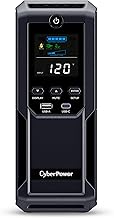 | CP1500AVRLCD3 Intelligent LCD UPS Battery Backup | Mid‑Range Value | 8.5/10 | Check price → |
 | AVRG750LCD Intelligent LCD UPS Battery Backup | Budget Compact | 7.0/10 | Check price → |
 | BRG1500AVRLCD2 Intelligent LCD UPS Battery Backup | Long Warranty | 8.5/10 | Check price → |
 | EC850LCD Ecologic UPS Battery Backup Surge | Eco‑Friendly Compact | 7.5/10 | Check price → |
Scroll sideways on small screens to see every column.
CP1500PFCLCD PFC Sinewave UPS Battery Backup: Best Overall for Gaming
CP1500PFCLCD PFC Sinewave UPS Battery Backup: Best Overall for Gaming
CP1500AVRLCD3 Intelligent LCD UPS Battery Backup: Best Value for Mid‑Range Systems
CP1500AVRLCD3 Intelligent LCD UPS Battery Backup: Best Value for Mid‑Range Systems
AVRG750LCD Intelligent LCD UPS Battery Backup: Best Compact for Budget Builds
AVRG750LCD Intelligent LCD UPS Battery Backup: Best Compact for Budget Builds
BRG1500AVRLCD2 Intelligent LCD UPS Battery Backup: Best Warranty for Peace of Mind
BRG1500AVRLCD2 Intelligent LCD UPS Battery Backup: Best Warranty for Peace of Mind
EC850LCD Ecologic UPS Battery Backup Surge: Best for Eco‑Friendly Users
EC850LCD Ecologic UPS Battery Backup Surge: Best for Eco‑Friendly Users
Buying Guide: Power, Waveform, Warranty, and Budget
Choosing the right UPS for your gaming PC comes down to four main factors. Here is what you need to know.
How Much Power Do You Actually Need?
The most important spec is the wattage rating. A UPS's wattage tells you how much load it can support. For a typical gaming PC with a mid‑range GPU like an RTX 4060 or RX 7600, your peak draw is around 350 to 450 watts.
Add a monitor and peripherals, and you need at least 500 to 600 watts.
The models here range from 450W (AVRG750LCD) to 1000W (CP1500PFCLCD). For most builds, 900W is plenty. If you run a high‑end rig with an RTX 4090 and a 14900K, you might need more than 1000W, but that's rare.
Always add up your components using a power supply calculator to be sure.
Pure Sine Wave vs. Simulated Sine Wave
This is the biggest technical difference between the models. Pure sine wave output closely mimics the clean power from your wall outlet. Simulated sine wave (also called stepped or modified sine wave) is a rough approximation.
Modern power supplies with Active Power Factor Correction (Active PFC) often require pure sine wave to stay stable during a power outage. If you feed them a simulated sine wave, they may shut down, restart, or switch to battery power unexpectedly. Most 80+ Gold and higher PSUs use Active PFC.
The CP1500PFCLCD is the only pure sine wave model here. If your PSU is older or doesn't use Active PFC, the simulated sine wave models like the CP1500AVRLCD3 and BRG1500AVRLCD2 will work fine and save you money.
Warranty and Connected Equipment Coverage
All Cyberpower UPS models come with a warranty that covers the unit itself and sometimes connected equipment. The standard warranty is 3 years. The BRG1500AVRLCD2 extends that to 5 years, which is a significant benefit if you want long‑term protection.
If your gaming PC is worth several thousand dollars, the extra warranty cost is a small price for peace of mind. Just remember to register the product and keep your receipts.
Budget and Value
The prices across this lineup vary considerably. The AVRG750LCD is the most affordable, while the CP1500PFCLCD is the most expensive due to its pure sine wave output. The CP1500AVRLCD3 and BRG1500AVRLCD2 sit in the middle, offering good value for mid‑range builds.
A good rule of thumb: if your PC cost over $1500, spend the extra for pure sine wave. If your build is under $1000, a simulated sine wave model will protect your investment just fine.
To see how these factors play out on real picks, compare the CP1500PFCLCD PFC Sinewave UPS Battery Backup, CP1500AVRLCD3 Intelligent LCD UPS Battery Backup and the AVRG750LCD Intelligent LCD UPS Battery Backup reviewed above.
Who Should NOT Buy Best Cyberpower UPS for Gaming PC
A UPS is not the right purchase for everyone. Here are three types of buyers who should skip this category and look at something else.
You Run a Low‑Power Casual Gaming PC
If your gaming PC draws under 300 watts and you only play older titles or esports games, a basic surge protector with a power strip may be enough. Surge protectors cost a fraction of a UPS and protect against spikes. They won't keep your PC running during a blackout, but if losing a few minutes of playtime doesn't bother you, save your money.
You Need Whole‑Home Backup
A UPS like the ones here provides 10 to 20 minutes of runtime, enough to save your game and shut down. If you want to keep your entire home office running for hours during a long outage, you need a standby generatoror a portable power station. A UPS is designed for short-term backup to prevent data loss, not for extended runtime.
You Have a Very Old PSU Without Active PFC
If your power supply is from the early 2010s or older, it likely doesn't use Active Power Factor Correction. In that case, a simulated sine wave UPS works perfectly fine, and you don't need to pay extra for pure sine wave. The CP1500AVRLCD3 or BRG1500AVRLCD2 will save you money while still providing solid protection.
Final Verdict
The CP1500PFCLCD PFC Sinewave UPS is the clear winner for most gamers. Its pure sine wave output ensures compatibility with modern Active PFC power supplies, and its 1000W capacity handles nearly any single-GPU build. If your PSU is older or you don't need pure sine wave, the CP1500AVRLCD3 offers excellent value with 900W and USB charging.
Want a longer warranty? The BRG1500AVRLCD2 gives you 5 years of coverage. Need a compact budget option?
The AVRG750LCD fits small desks and tight budgets. And if you're eco-conscious, the EC850LCD with ECO mode saves power when idle.
If you're still unsure whether a UPS is right for you, go back to the Who Should NOT Buy section above. A UPS is a smart investment for most gaming PCs, but only if your build actually needs it.
FAQ
What's the best Cyberpower UPS for Gaming PC overall?
The CP1500PFCLCD PFC Sinewave UPS is the best overall because it delivers pure sine wave output, which is essential for modern gaming power supplies with Active PFC.
Do I need pure sine wave for my gaming PC?
Only if your power supply uses Active Power Factor Correction. Most 80+ Gold and higher PSUs do. If you're unsure, check your PSU's spec sheet.
If it doesn't mention Active PFC, a simulated sine wave UPS will work fine.
How long will a UPS keep my gaming PC running during a blackout?
Typically 10 to 20 minutes under load, depending on the wattage of your PC and the UPS capacity. This is enough time to save your game and shut down safely.
Can I plug a monitor and speakers into the same UPS?
Yes, but only into the battery-backed outlets. Most models have 6 battery outlets and 6 surge-only outlets. Plug your PC and monitor into the battery outlets, and speakers or other peripherals into the surge-only outlets.
What is the difference between VA and Watts on a UPS?
VA (Volt-Amps) is the apparent power, while Watts is the real power your PC actually uses. The wattage rating is what matters for your build. A 1500VA UPS with 900W means you can draw up to 900 watts continuously.
How often should I replace the battery in my UPS?
Every 3 to 5 years, depending on usage. The LCD display on most models shows battery health. When runtime drops significantly, it's time for a replacement.
Cyberpower sells replacement battery packs for most models.

Similar Posts